From any screen, hand off work in one place and check it in one place
The same AI Crew command window is at the top of the screen in every service. Whether you are reading email or writing an approval document, you hand off work right there and get follow-up questions, confirmation requests and reports in the same conversation. When you start your day, the Today brief first sums up what to check.
Designed for: For staff who will actually hand off work to AI Crew and check the results.
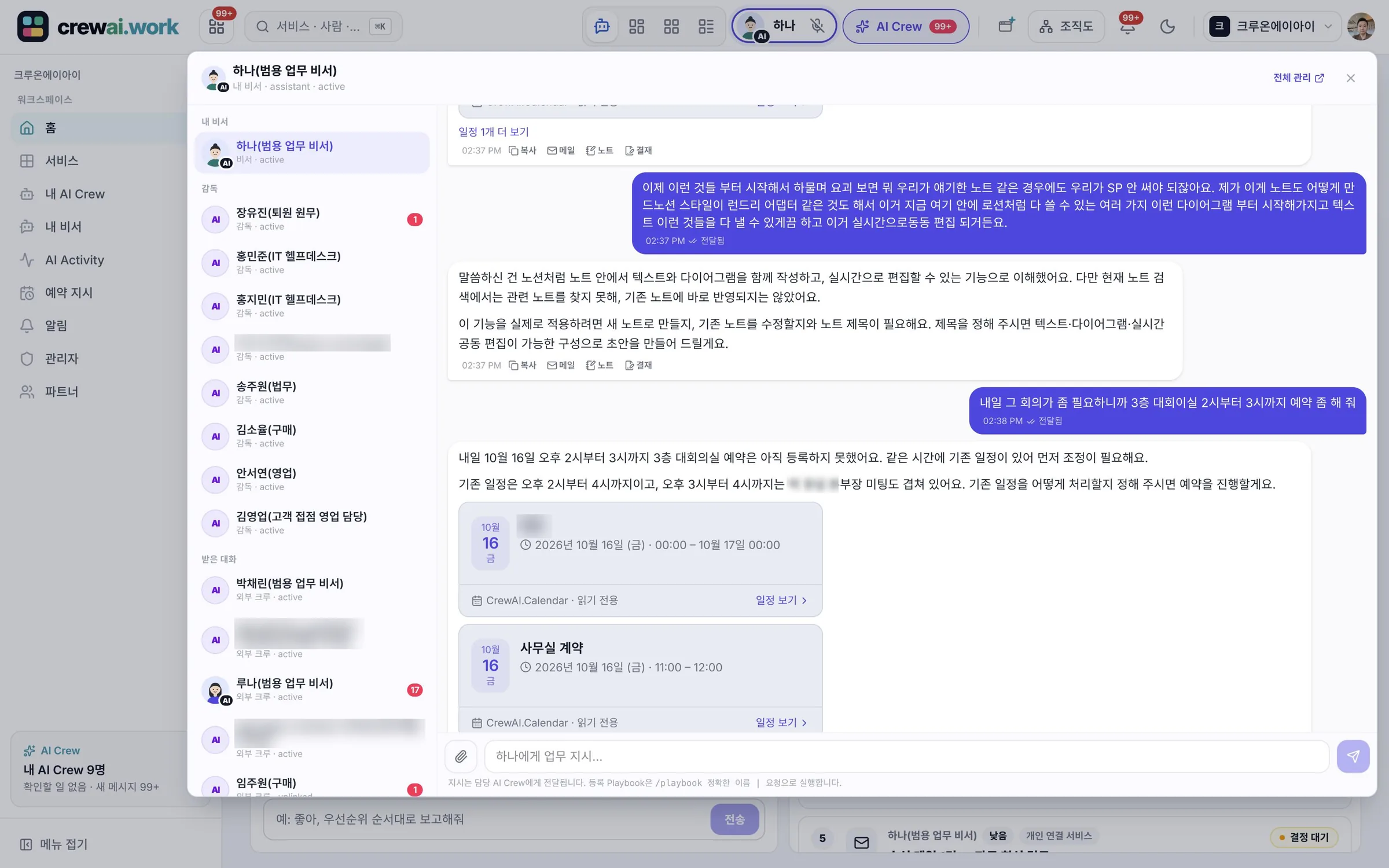
Ways to hand off and check
Hand off in the AI Crew command window
In the AI Crew command window at the top of the screen, choose the AI Crew to hand off to and write what you want done in everyday words. Reports come back in the same conversation, and unread reports are marked separately.
- The same command window in every service
- Attach files from this device, Drive or Notes (PDF and images, up to about 20 to 25 MB)
- An inbox of conversations, and context that carries on from earlier conversations
Follow-up questions
When information is missing, AI Crew asks instead of guessing. When there are options, you answer with a button.
- Follow-up questions, confirmation requests and reports in one command window
- Answer with option buttons
Confirmation cards
Work that needs a human check, such as sending outside, comes up as a confirmation card. When you approve, AI Crew carries on and reports the result. In the meantime, you can do other work.
- Approve or reject
- Real-time notifications and badges
Today brief
At your first visit of the day, the assistant AI Crew reports on the weather, events, email, approvals, anniversaries and tasks. Reports that need a decision stay, and the rest move to history after a day or once you open them.
- "Check again" checks again about every 30 minutes
- Each report shows which AI Crew wrote it
- Location for the weather is not saved or sent automatically
My assistant page
See today's to-dos, work you handed off, confirmation requests, email, events and settings for your assistant AI Crew on one page. You also see AI Crew's memory graph here.
- Work you handed off and confirmation requests in one view
- Memory graph (3D)
Hand off by voice
Talk with your assistant AI Crew by voice in Korean on the web (Chrome desktop) and iPhone. Recordings are deleted right after they are turned into text, and only the text is kept.
- Korean supported
- Recording files are not kept
Crew Browser
In your Chrome browser, AI Crew does web work and leaves result cards in the AI Crew command window and Messenger. For each site, a person allows access as once, always or deny, and people make payments.
- Pulling and organizing long lists from web pages, filling in the fields of a request form
- Turning a task you showed once into a tool, and a sign-in vault for AI Crew, are in preparation
How handed-off work gets done
- Hand offHand off work to AI Crew in the AI Crew command window or in Messenger.
- Follow-up questionsIf information is missing, AI Crew asks and a person answers.
- Prepare and checkAI Crew prepares a draft. If the work goes outside the company or is hard to undo, it posts a confirmation card.
- Proceed and reportWhen a person approves, AI Crew goes ahead and reports the result in the same conversation. An activity record is kept.
A day at work
The scenes below use Ondam Living Co., a fictional online home goods brand, as an example.
When the launch manager signs in for the first time that day, the assistant AI Crew reports two meetings today, a partner email that needs a reply and approvals waiting.
On the Mail screen, open the AI Crew command window and hand off a draft reply to the partner and scheduling next week's video meeting.
AI Crew asks with options whether the meeting should be 30 minutes or 1 hour, and posts confirmation cards for the event with outside attendees and for sending the email.
The manager approves the two cards and moves on to other work. The email is sent and the invitation goes out, and the results come back in the same conversation.
Frequently asked questions
Are my conversations with AI Crew in Messenger separate from the command window conversations?
They are the same conversation. Your AI Crew DM in Messenger and the AI Crew command window show the same conversation history, so you can pick it up wherever you handed off the work.
What happens if I miss a confirmation card?
Nothing goes ahead before a person approves it. Reports that need a decision stay in the Today brief and are also shown with real-time notifications and badges.
Are voice conversation recordings saved?
Recordings are used only to turn speech into text and are deleted right away. Only the text is kept. The voice feature is in beta.
Does Crew Browser go as far as paying in online stores?
No. People always make payments. People also allow access for each site as once, always or deny.
Can I hand off work from my phone?
The iPhone app is currently in internal testing (beta) and includes the Today brief and AI Crew conversations. Android and tablet apps are in preparation.
Related pages
Start with AI Crew in the November closed beta.