AI Crew answers customer questions first, and agents take the cases that need a judgment call
Contact Center collects customer questions from your company website and your Kakao channel in one admin screen. AI Crew answers customers first, based on your support knowledge. Questions that need a person's judgment, such as discounts or order changes, go to an agent. Questions it could not answer are collected separately and become material for growing your support knowledge.
Designed for: Online brands that run customer support with a small team, and support leads who want to separate repeat questions from questions that need a judgment call
When you need it
Much of support time goes to giving the same answer to the same question.
When a new product launches, the same questions pile up: delivery dates, how to use it, how to clean it. If AI Crew answers first from your support knowledge, agents can spend their time on questions that need a judgment call.
Questions that arrive after business hours wait until the next morning. Even at night, AI Crew answers first in the website chat widget and sets aside the cases a person needs to see for an agent, so they can be picked up first thing in the morning.
It is hard to collect what customers asked that went unanswered. Review the questions in "unanswered questions", add answers to your support knowledge, and the next answers get better.
How it differs from general work tools
AI Crew is the first to answer the customer. Agents focus on handed-off questions and answers that need review.
For questions that need a judgment call, such as discounts and order changes, AI Crew asks to hand them off to an agent. The agent picks up the earlier conversation and replies.
Questions it could not answer are collected separately. Once an agent adds an answer, AI Crew uses it from the next customer on.
Key features
Receive, answer, hand off and review customer questions in one admin screen.
Website chat widget, Kakao and web channels
Add one line of code (a script) to your company website and a chat widget appears. Questions from the web and your Kakao channel arrive in the same admin screen.
- Install the chat widget with one line of script
- Web and Kakao channel questions in one screen
Inbox and support overview
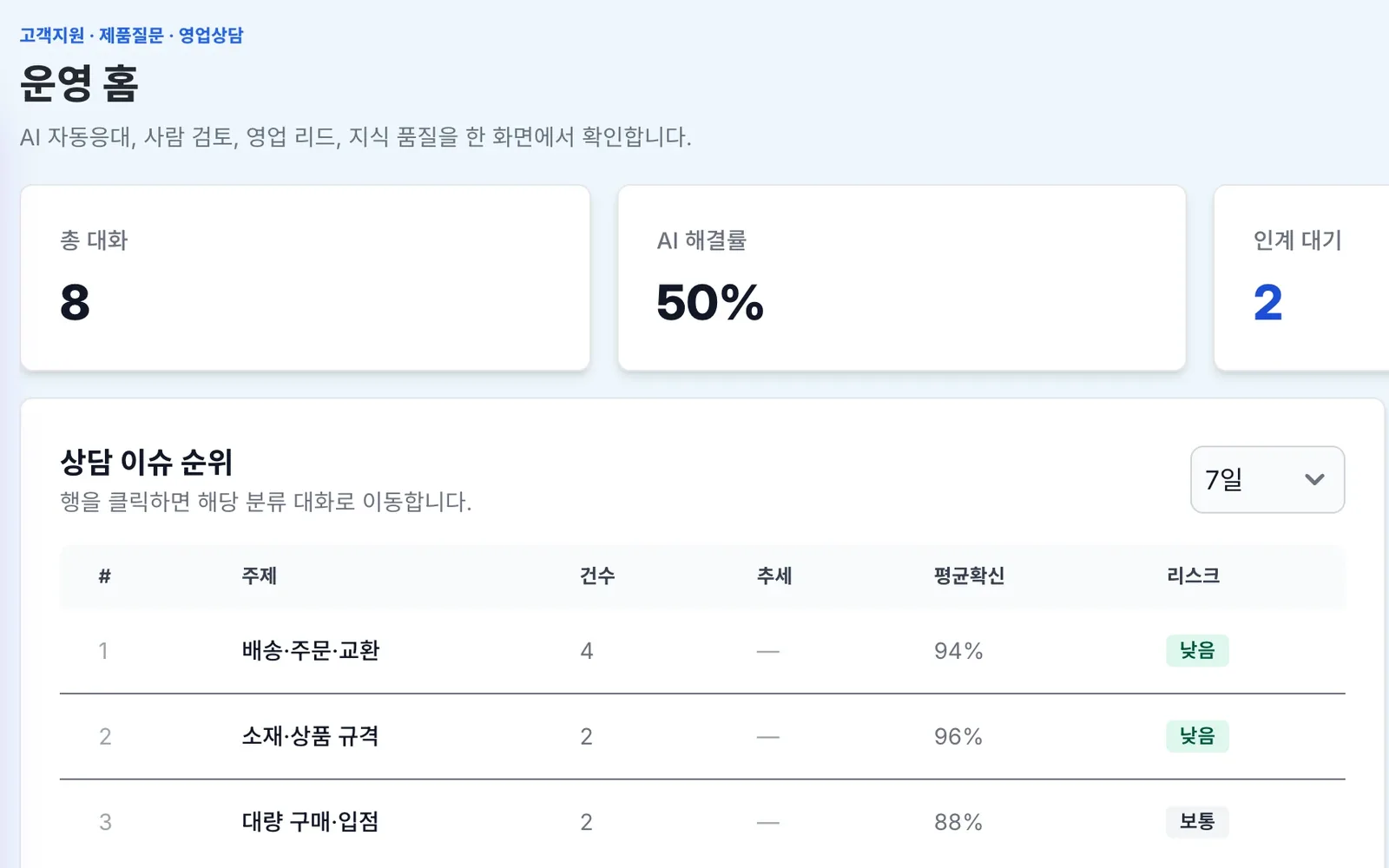
Check new questions in the inbox. See total conversations, questions waiting for handoff to an agent and common support topics in one screen. You can see right away where today's questions are piling up.
- Check new questions in the inbox
- See questions waiting for handoff
- View common support topics
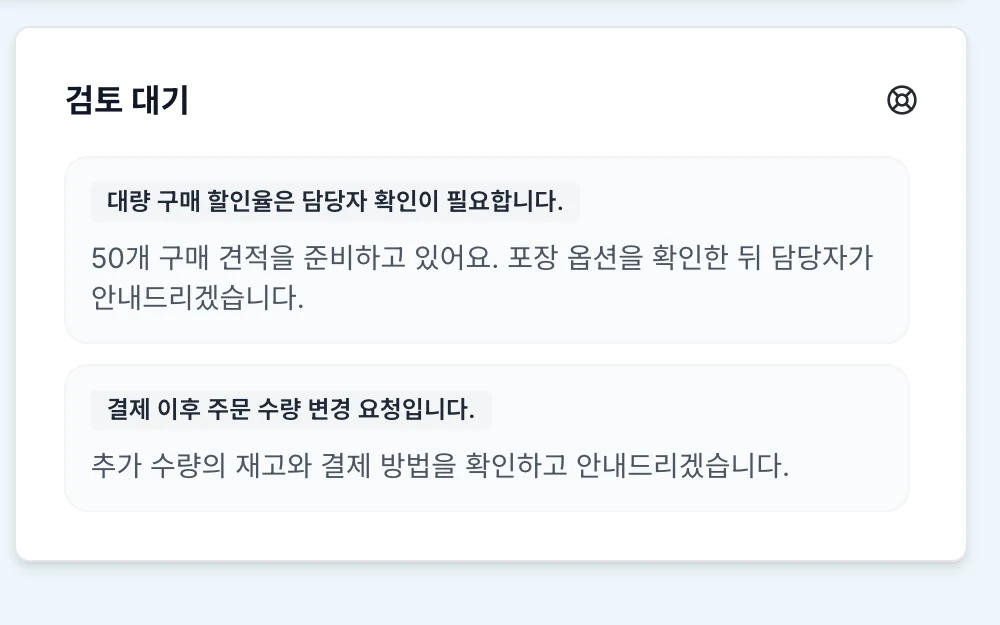
AI Crew first answers and handoff to agents
AI Crew answers the customer first. For questions that need a judgment call, such as discounts or order changes, it asks to hand them off to an agent. The agent reads the earlier conversation and continues the reply.
- AI Crew answers the customer first
- Asks to hand off questions that need a judgment call to an agent
- An agent continues the reply
Support knowledge and "unanswered questions"
Organize support knowledge, such as product information, delivery and exchanges, in the admin screen. Questions AI Crew could not answer are collected separately. When an agent adds an answer, it is used in the next consultation.
- Manage support knowledge
- View unanswered questions together
- Add answers to grow support knowledge
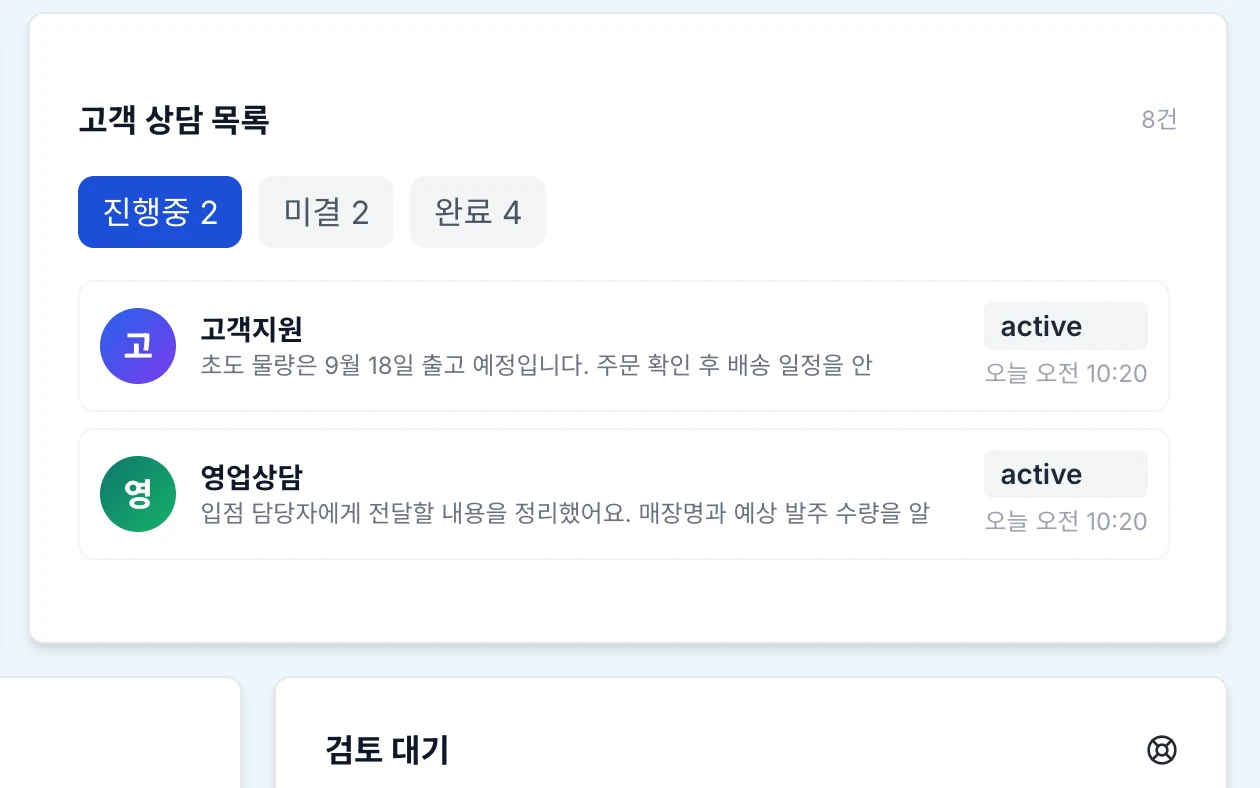
Cases, scenarios, leads and review
View cases by in progress, open and done, and check the last answer for each question. Set up the support flow as scenarios, and collect customers who showed buying interest during a consultation as leads. Look back at the answers AI Crew gave on the review screen.
- View cases by status
- Set the support flow with scenarios
- Collect leads and review answers
Stronger agent handoff and customer management system integration
We are preparing finer control over the handoff to agents, and integration with customer relationship management (CRM) systems.
- Stronger agent handoff
- Customer relationship management (CRM) integration
What AI Crew does and what people decide
- Answers customers first, based on support knowledge
- Hands off questions that need a judgment call to an agent
- Collects questions it could not answer
- Answers that need a judgment call, such as discounts and order changes
- Handling handed-off questions
- Setting support knowledge and scenarios
- Reviewing AI Crew answers
Working with AI Crew: an example
Example: in the first week after the fictional company Ondam Living Co. launches the "Ondam mug set", questions pile up in the website chat widget.
At 11 p.m., a customer asks in the website chat widget, "Can the mug set go in the dishwasher?"
AI Crew answers how to clean it, based on the product information in the support knowledge.
The customer asks, "Is there a discount if I buy two sets?" AI Crew explains that an agent will check and reply, and hands the question off to an agent.
The next morning, an agent reads the earlier conversation and answers the discount question directly. The agent then adds answers to the questions in "unanswered questions" to grow the support knowledge.
Connected work in other services
Contact Center runs on the same accounts, permissions and check principles as the other services.
Sign in to the admin screen with the same login, organization and permissions as crewai.work.
Follows the rule that agents handle answers that need a judgment call.
We are preparing integration with customer relationship management (CRM) systems.
Admin and security
- AI Crew hands off questions that need a judgment call to an agent.
- You can look back at the answers AI Crew gave on the review screen.
- Sign in once, and you see only the screens that fit your role.
- Each company's data is kept separate on both the server and the database.
Frequently asked questions
Is it hard to add the chat widget to our website?
It is simple. Add one line of code (a script) to your company website and a chat widget appears.
Can we receive questions that come in through Kakao?
Yes. Questions from the web and your Kakao channel arrive in the same admin screen.
Does AI Crew answer every question?
AI Crew answers first. Questions that need a judgment call, such as discounts and order changes, go to an agent, and you can look at the answers AI Crew gave again on the review screen.
What happens to questions AI Crew does not know?
They are collected separately in "unanswered questions". When an agent adds an answer, it becomes support knowledge and is used in the next consultation.
Does it connect to the customer management system we use now?
Customer relationship management (CRM) integration is in preparation. The specific connection scope is confirmed together during an adoption consultation.
Related pages
Start with AI Crew in the November closed beta.