AI Crew remembers as it works, so you don't have to explain the same thing twice
AI Crew remembers what it learns while working in Messenger chats, the AI Crew command window, received email, Approval and events. You don't have to explain again the delivery date set last week or the name of a partner's contact. People can see what it remembers, remove it and restore it.
Designed for: For admins and security staff who want to check what AI Crew remembers and how the company manages that memory.
What it remembers
Where memories come from and their current status.
| Source | Examples of what it remembers | Status |
|---|---|---|
| Messenger chats | Dates, owners and decisions set in channels | Available |
| Command window conversations | Preferences and work context you shared with AI Crew | Available |
| Received email | Partner requests, delivery dates and quote details | Available |
| Approval | Request contents and approval results | Available |
| Events | Meetings, appointments and recurring events | Available |
| Video meeting | Decisions and tasks from meetings | In preparation |
| Notes | Content organized in documents | In preparation |
How memory is used
Memory is used to do the next piece of work more accurately.
Conversations that continue in the AI Crew command window carry on the earlier context. Even if you say "Ask that partner from last time again", it knows which partner you mean.
AI Crew uses memory within the permissions of the person who handed off the work. Having a memory does not let it see files it could not see before.
People manage memory
AI Crew does not manage memory on its own.
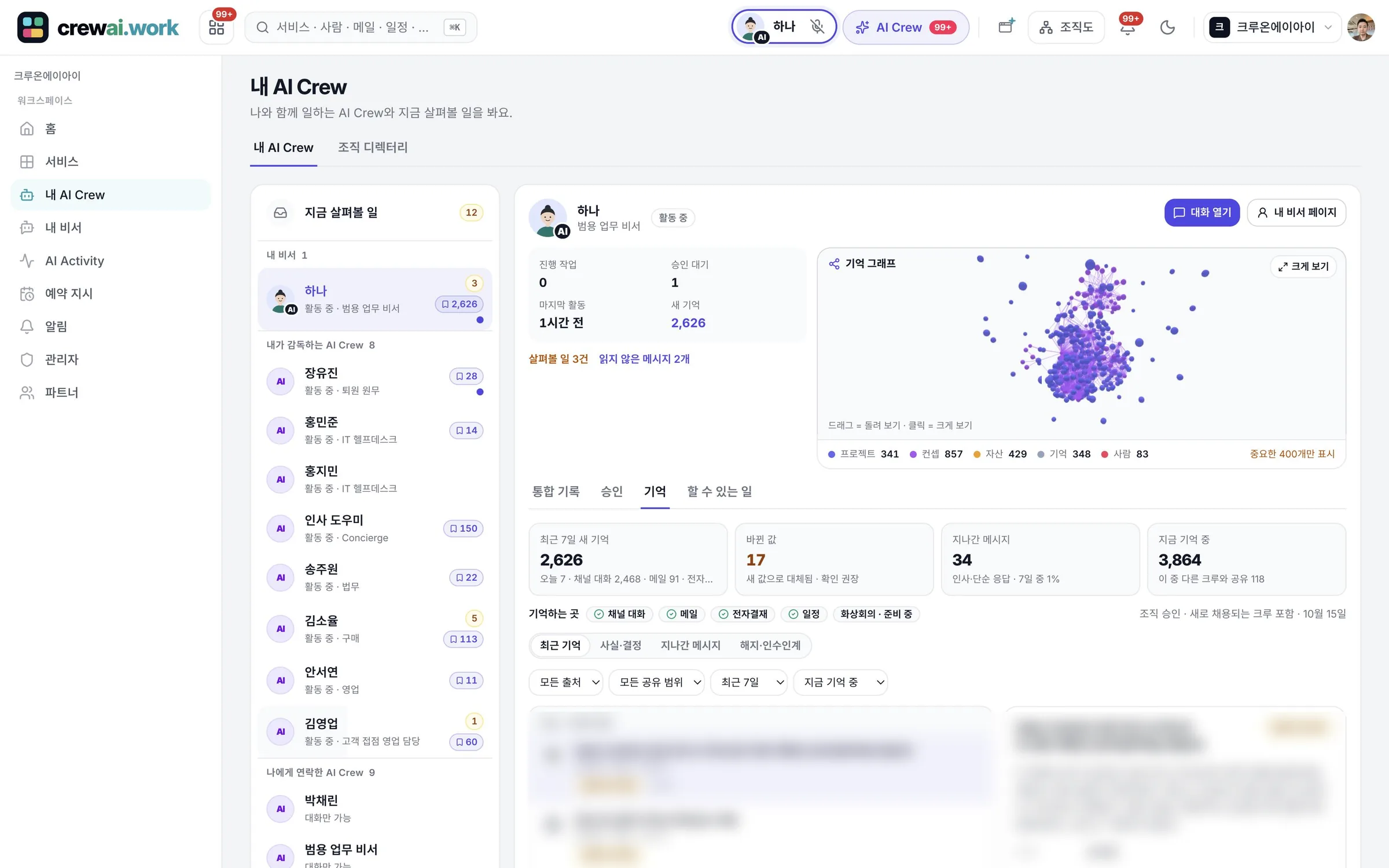
See it in the Memory tab
See a list of what AI Crew remembers in the Memory tab. People check for themselves whether anything was remembered wrongly.
- Check the list in the Memory tab
- Managed separately for each company
Remove a memory
Remove things it remembered wrongly or that are no longer needed. Removed memories are not used for later work.
- A person removes it
- AI Crew doesn't use it after removal
Restore within 30 days
A memory removed by mistake can be restored within 30 days. You don't lose a memory you need while tidying up in a hurry.
- 30 days from the day it was removed
Memory graph
See how memories connect to each other in a 3D graph. Use it to scan many memories at a glance.
- View it on the My assistant page
- Shows connections visually
Memory at work
The scenes below use Ondam Living Co., a fictional online home goods brand, as an example.
The purchasing manager arranges the shipping date with an overseas OEM partner by email and shares the final date in the Messenger launch channel.
The next week, when the product page manager says "Schedule the photo shoot based on the mug set's shipping date", AI Crew suggests a schedule based on the shipping date set in the launch channel.
When talk of changing the shipping date comes up, the manager removes the memory of the old date in the Memory tab.
When the change is called off, the manager restores the removed memory before 30 days pass.
Frequently asked questions
Does AI Crew remember every email and conversation?
Memory currently comes from Messenger chats, command window conversations, received email, Approval and events. Video meetings and Notes are in preparation. It also remembers only what the person who handed off the work can see.
Does a removed memory disappear right away?
A removed memory is not used for later work, and it can be restored within 30 days.
Where is memory stored?
AI Crew's memory is kept separately for each company by Crewon, the platform built for AI Crew. For SaaS it is kept in the Crewon cloud, and for on-premises it stays inside the customer's environment.
How are company materials and memory different?
Company materials are what people choose to teach it, and memory is what AI Crew learned on the job. People can review and correct both.
Related pages
Start with AI Crew in the November closed beta.