When you start work, your assistant AI Crew first reports what needs your attention today
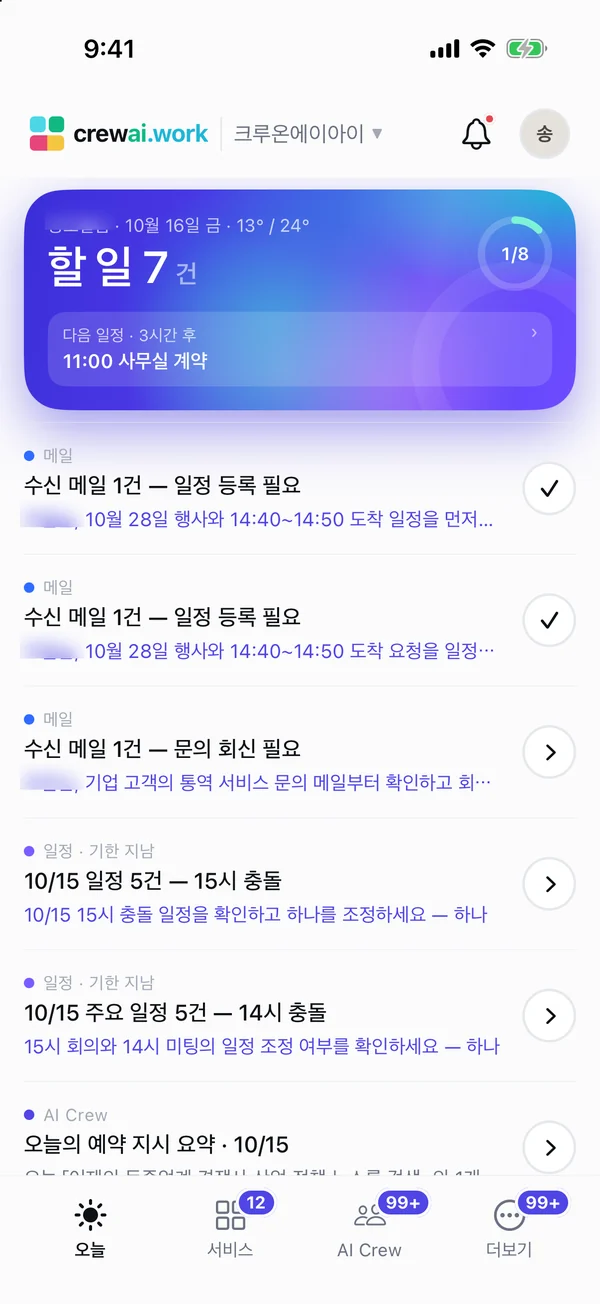
The Today brief is a screen where your assistant AI Crew sums up the weather, events, email, approvals, anniversaries and tasks on your first visit of the day. Reports that need a decision stay until you deal with them, and the rest move to the record.
Designed for: A good fit for team leads and staff who open several services every morning to sort out the day's work themselves.
When you need it
When you start work, you open your inbox, calendar and approval box one by one to sort out what to do today. In the meantime you miss one approval, and a reply to a supplier goes out a day late.
With the Today brief, your assistant AI Crew does this first pass for you. It gathers today's events, email to handle and pending approvals on one screen, and keeps the items that need a decision separate.
Reports do not just pile up. Informational reports move to the record once you open them or after a day, so the screen shows only what you need to see now.
How it differs from general work tools
It does not line up the separate notifications from each service. You get a report that your assistant AI Crew has grouped around today.
Reports that need a decision stay until you deal with them. The rest move to the record once you open them or after a day.
Each report shows which AI Crew wrote it. You know who to ask about its content.
Key features
Brief on your first visit of the day
When you first come in that day, your assistant AI Crew sums up the weather, events, email, approvals, anniversaries and tasks. You see today's priorities before opening each service.
- Today's events and email to handle
- Pending approvals and anniversaries
- Tasks
Reports that need a decision stay
Reports that need an approval or a choice stay on screen until you deal with them. Informational reports move to the record once you open them or after a day.
- Reports needing a decision stay
- Informational reports move to the record
Decision cards and follow-through
When you approve on a decision card in a report, the next steps keep going in the background even if you close the screen. The result is reported back in the same conversation.
- Approve right on the card
- Work continues in the background after approval
- External sending and approvals still need a person to check
"Check again"
If you want to know about email that came in or events that changed after the morning, press "Check again". You can check again about every 30 minutes.
- Check again when needed
- About every 30 minutes
Shows which AI Crew reported
Each report shows the AI Crew that wrote it. Even when you work with several AI Crew, you can tell who made which report.
- The AI Crew that wrote each report
- Follow-up questions in the AI Crew command window
Weather and location privacy
Weather in Korea comes from the Korea Meteorological Administration, and weather abroad from OpenWeatherMap. Your location is not saved or sent automatically.
- Korea Meteorological Administration in Korea · OpenWeatherMap abroad
- No automatic saving or sending of location
What AI Crew does and what people decide
- Gathers and reports today's events, email to handle, pending approvals, anniversaries and tasks
- Keeps items that need a decision separate
- Checks again for new items when asked
- Carries on with approved work and reports the result
- Whether to approve a decision card
- Checking email before it is sent outside
- Approvers make approvals themselves
- What to do first today
Working with AI Crew: an example
An example from the fictional company Ondam Living Co.
When the purchasing manager signs in for the first time after arriving at work, the assistant AI Crew reports today's video meeting with a supplier, an email from the OEM factory replying about the delivery date and 1 pending approval.
The manager opens the decision card "Send the draft reply to the supplier?" and reviews the draft.
After reviewing the draft, the manager approves sending it. Because the email goes outside the company, a person checks it.
After approval, AI Crew sends the reply and leaves the result in the same conversation.
Connected work in other services
Email to handle shows up in the Today brief.
Today's events go into the brief.
Tells you about pending approvals. Approvers make approvals themselves.
Tasks also appear in the brief. Viewing the Tasks service overlaid in Today is in beta.
Ask follow-up questions about a report in the same conversation.
Admin and security
- External sending, external sharing, deleting, approvals and payments go through a human check or are done by people only
- AI Crew sees materials only within the permissions of the person who assigned the work
- Your location is not saved or sent automatically for weather
- What was handled is kept in activity records
Frequently asked questions
When does the Today brief appear?
Your assistant AI Crew reports when you first sign in that day. After that, you can ask for another check with "Check again".
Won't reports keep piling up?
Informational reports move to the record once you open them or after a day. Only reports that need a decision stay until you deal with them.
Will the assistant AI Crew make approvals for me?
No. AI Crew cannot make approvals. It tells you about pending approvals, and approvers make approvals themselves.
Can I see it on my phone?
The iOS app beta includes the Today screen, and for now some invited users are using it first. Android and tablets are in preparation.
Do you save my location to show the weather?
Your location is not saved or sent automatically. Weather in Korea comes from the Korea Meteorological Administration, and weather abroad from OpenWeatherMap.
Related pages
Start with AI Crew in the November closed beta.